Renewing your Emirates ID? Log in with UAE Pass. Checking a traffic fine? UAE Pass. Filing a labour complaint, registering a tenancy or signing a document? You guessed it.
UAE Pass has quietly become the key to almost everything in the UAE. Yet many residents only set it up in a rush, when a website forces them to. Then they get stuck when they change phones, forget a PIN, or see a login request they didn’t make.
This guide fixes that. Here’s how to set up UAE Pass properly, what you can use it for, and how to keep it safe.
Quick answer: UAE Pass is the UAE’s national digital identity app. Download it, scan your Emirates ID, confirm with the OTP codes sent to your phone and email, create a PIN, and verify your face. You can then log in to thousands of government and private services, sign documents and store official papers. Never approve a login you didn’t start, and never share your PIN. Help is available 24/7 on 600 561 111.
What Is UAE Pass?
UAE Pass is your digital ID for the UAE. It lets you prove who you are online, using your smartphone, without separate usernames and passwords for every website.
It was launched in 2018 and is now used by millions of citizens and residents. With one account, you can:
- Log in to federal, local and many private services
- Sign documents digitally with a legally recognised signature
- Store and share official documents in a digital vault
- Verify documents that others share with you
What Can You Use UAE Pass For?
Here are some everyday tasks where UAE Pass makes life easier:
| Task | Where you’ll use UAE Pass |
| Renew your Emirates ID or visa | ICP and GDRFA services |
| Check and pay traffic fines | MOI and police apps |
| File a labour complaint | MOHRE app and website |
| Register or renew a tenancy | Dubai REST and Ejari services |
| Pay utility bills | Utility providers such as DEWA |
| Open or manage some bank accounts | Banks that support UAE Pass login |
| Get official documents and certificates | Your UAE Pass digital vault |
For example, you can renew your Emirates ID, check traffic fines or file a MOHRE complaint in minutes with UAE Pass, often without visiting a service centre.
How to Register for UAE Pass (Step by Step)
You’ll need a smartphone, your Emirates ID, and access to the phone number and email you want to use.
- Download the UAE Pass app from the App Store or Google Play. Check that the developer is the official UAE government entity.
- Tap “Create account” and choose to scan your Emirates ID.
- Scan your Emirates ID using your phone’s camera, or tap it on the back of your phone if your card and phone support it.
- Enter your mobile number and email, then type in the OTP codes sent to each.
- Create a PIN. Choose something you’ll remember but others can’t guess. Avoid birthdays and “1234”.
- Complete face verification. The app will ask you to take a selfie to match your face to your Emirates ID.
- Turn on biometric login (Face ID or fingerprint) for faster, safer access.
The whole process usually takes about 10 to 15 minutes. If face verification doesn’t work, you can verify your account at a UAE Pass kiosk in many government service centres.
Basic vs Verified Account
Not all UAE Pass accounts are equal. A verified account (completed with face verification or at a kiosk) gives you access to more services, including many that involve your visa, ID and legal documents. A basic account works for some services only.
If a website says your account level isn’t high enough, open the app and complete verification. It’s usually quick.
Logging In on a Computer
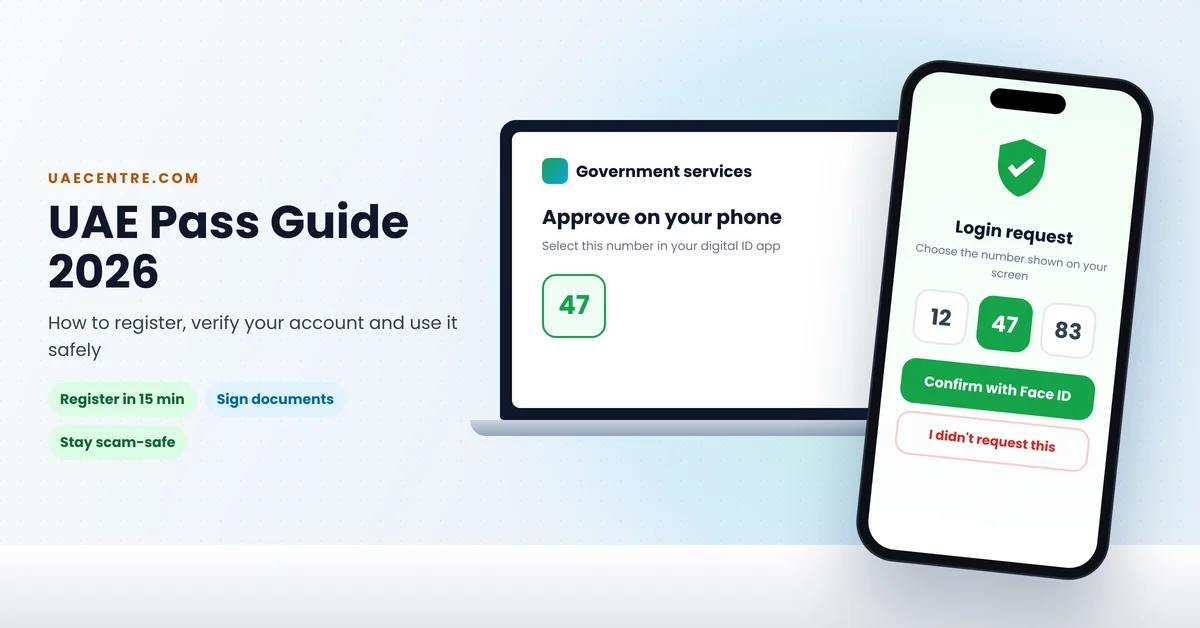
You don’t need to type passwords on a laptop either. On most websites, you click “Log in with UAE Pass” and enter your registered email, mobile number or Emirates ID number.
Your phone then shows a login request. To approve it, you may need to pick the matching number shown on the computer screen, then confirm with your PIN or Face ID. That’s it.
The matching-number step is a safety feature. If you didn’t start a login, you won’t see a number on your screen, so never approve it.
Your Digital Vault
UAE Pass includes a digital vault where you can keep official documents issued to you by connected government entities. This can include documents linked to your identity and residency.
When a service asks for a document, you can often share it straight from the vault instead of scanning paper copies. It’s faster, and the receiver knows the document is genuine.
How to Sign a Document With UAE Pass
- Open the UAE Pass app or website and choose the option to sign a document.
- Upload the PDF you need to sign, or open the document a service provider has sent you.
- Review the document carefully before signing.
- Confirm the signature with your PIN or biometrics.
- Download or share the signed document.
Digitally signed documents can be verified by the person who receives them, which helps protect against forgery.
Changing Your Phone? Do This First
This is where many people get stuck. UAE Pass is linked to your device, so moving to a new phone needs a little care:
- Keep your old phone working until the new one is set up, if you can.
- Install UAE Pass on the new phone and log in with your Emirates ID details.
- Confirm with OTPs sent to your registered phone number and email. Make sure both are still active.
- Complete face verification again if the app asks.
- Remove the old phone, or reset it to factory settings before selling it.
Lost or stolen phone? Contact UAE Pass on 600 561 111 straight away to protect your account. Also inform your mobile operator to block your SIM or eSIM.
Common Problems and Quick Fixes
| Problem | Try this |
| Forgot your PIN | Use the “Forgot PIN” option in the app and verify with OTPs and your face |
| Not receiving OTPs | Check your number and email are correct and active, check spam folders, and make sure your phone has signal |
| Face verification fails | Use good lighting, remove glasses or hats, hold the phone at eye level, or visit a UAE Pass kiosk |
| “Account level not sufficient” | Complete verification in the app or at a kiosk |
| Emirates ID expired | Renew your Emirates ID first, then update UAE Pass |
| App not opening or crashing | Update the app and your phone’s software, then restart |
New to the UAE?
If you’ve just arrived, set up UAE Pass as soon as your Emirates ID is ready. You’ll need it for many first-month tasks, like registering your tenancy, setting up utilities and checking your visa.
Until your Emirates ID arrives, some services may let you create a basic account, but many important services need a verified one. So keep your ID handy, and verify your account the day you receive it.
Keep Your UAE Pass Safe: 7 Rules
Because UAE Pass unlocks so much, scammers love to target it. Protect yourself with these rules:
- Never approve a login request you didn’t start. Scammers sometimes trigger requests and hope you’ll tap “Approve”.
- Never share your PIN or OTPs, even with someone claiming to be from a government office, bank or police.
- Only use the official app, downloaded from official stores.
- Check the website address before logging in. Fake login pages are common.
- Turn on biometric login and lock your phone with a strong passcode.
- Keep your phone number and email up to date in the app.
- Review your activity in the app regularly, and report anything strange.
Learn more about how fraudsters operate in our guide to online scams in the UAE.
Using UAE Pass for Home and Money Tasks
UAE Pass isn’t just for visas and IDs. It also makes everyday home admin easier. You can log in to services to view your tenancy contract, deal with rental disputes, or manage your DEWA bill with fewer passwords to remember.
Some banks also let you open accounts or log in with UAE Pass. It saves time, but stay careful: only log in through your bank’s official app or website.
Frequently Asked Questions:
Final Word: Set It Up Properly Once
UAE Pass is one of the most useful apps on your phone if you live in the UAE. Take 15 minutes to set it up properly, verify your account, turn on biometrics and check your contact details. Then keep it safe. It’ll save you hours of queues and paperwork for years to come.
Official sources: UAE Pass and the UAE Government portal.
This guide is for general information. Features, account levels and steps may change, so check the official UAE Pass website or app for the latest information. Last updated: 24 October 2026.